The Gerber Out
function is used to create a set of data files on disk in RS-274-D (sometimes incorrectly referred to as RS-274-X) format for subsequent plotting by a Gerber photo plotter.
When you select this function, a dialog box will appear for the specification of the desired output data files.
An aperture list (wheel) is automatically created by the program before the Gerber output files are written.
Hover over the image for pop-up help, or click on the tabs for navigation.
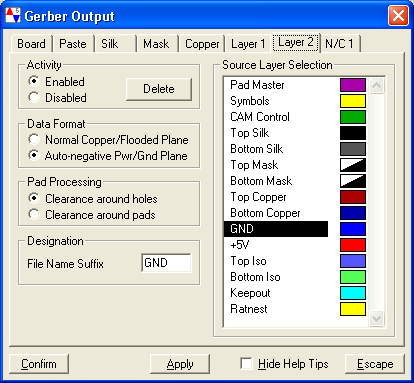
Layer 2: The Layer 2 tab controls the creation of a Gerber file of copper pads and
tracks layer to be embedded into the middle of the circuit board. These
files usually are generated in pairs and are used only on multi-layered
circuit boards.
Activity Enabled
If this selection is activated, no file will be generated from this tab,
and all data contained within the tab will be discarded when the dialog
box is closed. This selection is mutually exclusive with the "Enabled"
button immediately above. Disabled
If this selection is activated, no file will be generated from this tab,
and all data contained within the tab will be discarded when the dialog
box is closed. This selection is mutually exclusive with the "Enabled"
button immediately above. Delete
If you click on this pushbutton, the tab for this layer will be deleted and
all selections on the tab will be discarded. You may create additional
mid layers from the "Board" tab of this dialog box.
Data Format Normal Copper Layer
If this selection is activated, the mid-layer copper file will be created as
a positive (non-inverted) data set. This format must be used for all
normal copper layers and all manually flooded power and ground planes.
Automatically generated power/ground planes must not use this format.
This selection is mutually exclusive with the "Auto-negative" button
immediately below. Normal Copper Layer
If this selection is activated, the mid-layer copper file will be created as
a positive (non-inverted) data set. This format must be used for all
normal copper layers and all manually flooded power and ground planes.
Automatically generated power/ground planes must not use this format.
This selection is mutually exclusive with the "Auto-negative" button
immediately below.
Pad Processing Clearance Around Holes
If this selection is activated, the power/ground plane will contain a
circular "clearance" zone around all drill holes that are not attached to
this layer. Pads that are to be attached to this plane layer will be built
with a thermally relieved pad of the appropriate size. This selection is
mutually exclusive with the "Clearance Around Pads" button immediately
below. Clearance Around Holes
If this selection is activated, the power/ground plane will contain a
circular "clearance" zone around all drill holes that are not attached to
this layer. Pads that are to be attached to this plane layer will be built
with a thermally relieved pad of the appropriate size. This selection is
mutually exclusive with the "Clearance Around Pads" button immediately
below.
Source Layers Table
This multi-selection list box shows the current layers that have been selected for inclusion into the graphical output data. You may select source layers at your discretion, and those layers may contain any set of graphical objects that you desire. Sometimes (on a simple four layer board) a designer will create a set of manually flooded "power planes" in the layout portion of the project and merge them into a single layer in this output stage. On auto-negative power/ground planes, it is often times convenient to create a separate "keepout" layer to provide special clearances for board edges and higher voltage connector pins. Such layers should be included into this set. Layer zero contains pad and component data and may not be included into into this group.